Claude Code Memory Bloat: The Hidden Context Leak Your IDE May Not Show
By MobileVibe Team · July 30, 2026 · 13 min read
Claude Code Memory Bloat: The Hidden Context Leak Your IDE May Not Show
Quick answer
Claude Code memory files are useful, but they can quietly grow large enough to waste meaningful context before the actual task begins. If you mostly use Claude Code through Cursor, an IDE integration, Desktop, Web, or a wrapper, periodically open the CLI and run /memory so you can see warnings, trim stale notes, and keep your agent focused.
Key takeaways
- Claude Code memory is loaded into sessions as persistent project context, so bloated memory is not harmless background storage.
- The CLI can surface memory-size warnings that may be easier to miss in other surfaces.
- In one real project,
ROSTER.mdhad grown to 302,700 characters andCURRENT-STATE.mdhad grown to about 1.3 million characters. - Treat memory files like source-controlled docs: short, current, reviewed, and aggressively pruned.
- MobileVibe is a good way to monitor and unblock agents from a phone, but this is exactly the kind of maintenance check you should still run on the real desktop environment.
The warning I only saw in the CLI
I hit a strange Claude Code problem this week: the agent was not broken, the model was not worse, and the repo was not too large in the normal sense.
The problem was memory.
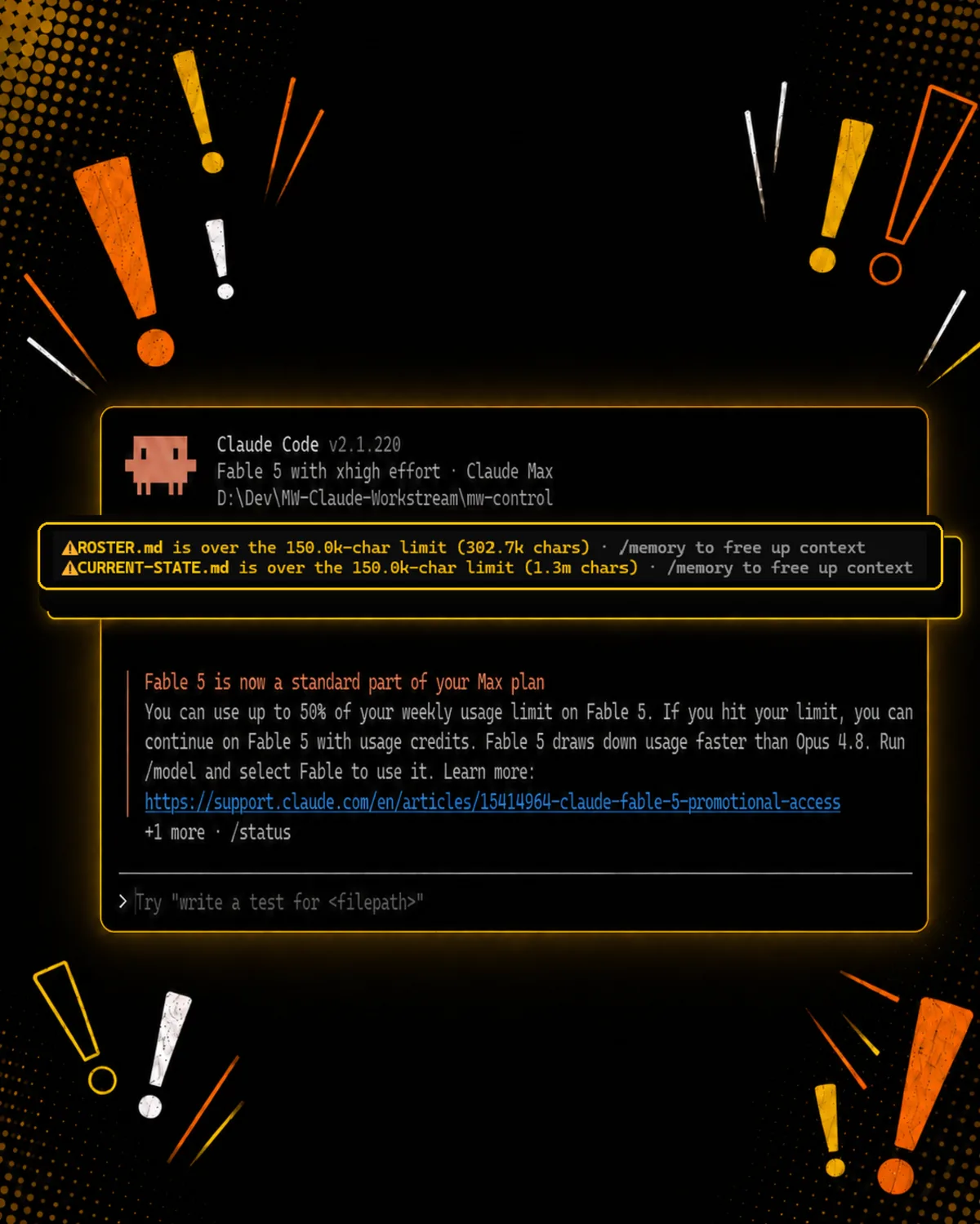
When I opened Claude Code in the CLI, it immediately warned that two memory files were over the limit:
ROSTER.md: 302,700 characters
CURRENT-STATE.md: 1.3 million characters
The warning said to use /memory to free up context. That is the important part. These were not random archive files sitting somewhere on disk. They were memory files that Claude Code cared about, and they were large enough to put pressure on the context window before I had even started the next task.
I had been using Claude Code through other surfaces and had not noticed the warning there. That does not prove every IDE integration hides every warning forever. Anthropic’s own overview says Claude Code surfaces connect to the same underlying engine, and Claude Code memory is part of that cross-surface behavior. But the practical lesson still holds: if a surface makes a warning less visible, you can end up paying for that invisibility in every session.
So yes, apparently there is still a reason to use the command line. Who knew?
Why memory bloat matters
Claude Code memory exists for a good reason. Anthropic’s memory docs describe two persistent mechanisms: CLAUDE.md files that you write, and auto-memory notes that Claude writes based on corrections and project patterns. That is exactly the kind of thing you want in a long-running engineering workflow.
The trade-off is that memory is not free.
Every session starts with a fresh context window. Persistent instructions and memory are one way Claude carries knowledge across those fresh sessions. If those files are tight, they help. If they become a dumping ground, they can push stale state, duplicate decisions, retired plans, old debugging notes, and obsolete routing instructions into the work area of every future conversation.
The failure mode is subtle:
- Claude seems less sharp because it is reading stale context.
- The useful part of the prompt has less room.
- Old instructions compete with newer instructions.
- The agent spends attention on historical detail instead of the current diff.
- Long-running projects accumulate context debt that nobody owns.
That is why this is more than a housekeeping issue. It is an agent quality issue.
Other Claude Code warnings worth watching for
The memory warning is only one class of signal you can miss if you never look at the raw Claude Code session. The exact wording changes as Anthropic ships updates, and you should not build automation around copied UI text. But for humans, these warning patterns are worth recognizing.
Memory file over the character limit
This is the warning that started the whole cleanup:
ROSTER.md is over the 150.0k-char limit (302.7k chars) - /memory to free up context
CURRENT-STATE.md is over the 150.0k-char limit (1.3m chars) - /memory to free up context
If you see something like this, do not treat it as cosmetic. The fix is not to switch models. The fix is to prune memory.
Search terms people will use when this happens:
Claude Code memory file over 150k char limitClaude Code /memory free up contextCLAUDE.md too large context windowClaude Code memory bloatedClaude Code quietly using context
Plan usage limit reached
Anthropic’s Claude Code plan docs say Pro and Max users can either wait for limits to reset, upgrade plans, or enable usage credits to keep working past the included usage limit. Anthropic’s cost docs also point Claude Code users to /usage-credits after signing in with a claude.ai subscription.
The exact message may vary, but the thing to watch for is the difference between a plan usage limit and a server/rate-limit problem. A plan usage limit means your subscription bucket is exhausted or near exhausted. Waiting, reducing usage, changing model/effort, upgrading, or enabling credits may be the answer.
Search terms people will use:
Claude Code usage limit reachedClaude Code Max plan limitClaude Code Pro plan usage limitClaude Code enable usage creditsClaude Code /usage-creditsClaude Code wait until usage limits reset
Fable or high-effort usage warnings
The screenshot that triggered this post also included a Fable 5 notice:
Fable 5 is now a standard part of your Max plan
You can use up to 50% of your weekly usage limit on Fable 5
If you hit your limit, you can continue on Fable 5 with usage credits
Fable 5 draws down usage faster than Opus 4.8
Run /model and select Fable to use it
That is useful SEO material because it answers a real question developers have when Claude suddenly feels unavailable: “Am I out of Claude, out of Fable, out of credits, or just on the wrong model setting?”
Anthropic’s model and effort help docs make the same general point: higher effort can produce more thorough answers, but it uses more tokens and can make you hit limits faster. So if Claude Code warns you about usage, check the model and effort setting before assuming the agent is broken.
Search terms people will use:
Fable 5 Claude Code usage limitFable 5 Max plan 50% weekly usageFable 5 usage creditsClaude Code Fable draws down usage fasterClaude Code high effort usage limitClaude model effort uses more tokens
Server rate limit or 429
Do not lump every failure into “I ran out of Claude.” Anthropic’s API docs use HTTP 429 for rate-limit situations, and Claude Code release notes say newer Claude Code versions distinguish server rate limits from plan usage limits. They also point status-style server failures, such as 5xx or 529, toward status information.
That distinction matters:
- Plan usage limit: you used up included plan capacity or need usage credits.
- Rate limit or 429: your request pattern hit a rate-control boundary.
- 5xx or 529: Anthropic may be having a service-side issue.
- Memory warning: your local persistent context needs cleanup.
Different warning, different fix.
Search terms people will use:
Claude Code 429 errorClaude Code rate limit vs usage limitClaude Code plan usage limitClaude Code 529 errorClaude Code status.claude.com
What the docs imply
Anthropic’s Claude Code memory docs are worth reading directly: How Claude remembers your project.
The important ideas for working developers are:
- Claude Code uses persistent memory so project knowledge can carry across sessions.
- Project instructions live in files such as
CLAUDE.md. - Auto-memory can store learned patterns and notes for a repository.
- Memory should be specific and concise.
- Claude Code includes
/memoryas the user-facing tool for inspecting and managing this system.
The docs also make an architectural point that matters for teams: Claude Code has multiple surfaces. The Claude Code overview describes Terminal, VS Code, JetBrains, Desktop, Web, CI/CD, chat, and browser workflows as surfaces around the same underlying engine.
That is convenient, but it also means you should not assume the surface you like best is the best surface for every maintenance task. An IDE can be the right place to review code. A phone can be the right place to unblock an agent. The CLI may still be the clearest place to see raw operational warnings.
For usage and credit behavior, read Anthropic’s docs on managing Claude Code costs, using Claude Code with Pro or Max, usage limit best practices, model and effort settings, and the Claude Code release notes. Those pages are the right source of truth when wording, models, or limits change.
A practical memory audit
Here is the checklist I would run on any serious Claude Code project.
This one prompt can save a ton of tokens
If you already run agents through MobileVibe, the easiest fix is to ask a MobileVibe agent on your real desktop to audit the memory files for you. Give it permission to inspect the repo, measure the memory files, and propose a compact version before it edits anything.
Sample prompt:
Check this project for Claude Code memory bloat.

Find the Claude memory and project instruction files that are loaded for this repo, including CLAUDE.md and any auto-memory files Claude Code uses here. Report each file's path, character count, approximate token impact, and whether it contains stale state, duplicate summaries, old plans, retired agent rosters, or instructions that conflict with the current repo.

Then propose a compact replacement that keeps only durable facts future agents need: current build/test commands, deployment rules, architecture constraints, naming conventions, and safety rules. Do not delete or rewrite anything yet. Show me the proposed compact version first, with a short explanation of what you removed and why.
That prompt is boring on purpose. It asks for measurement first, cleanup second, and review before mutation. If your memory files are hundreds of thousands of characters long, one pass like this can save a ton of tokens across every future Claude Code session in that project.
1. Open the repo in the Claude Code CLI
Start from the same repository and folder where your normal agent work happens. If you use worktrees, check the worktree pattern too, because memory can be shared in ways that surprise you.
You are looking for startup warnings. Do not immediately paste a task. Let the tool tell you if it already knows something is wrong.
2. Run /memory
Use /memory to inspect what Claude thinks belongs in persistent context. The goal is not to delete everything. The goal is to separate stable knowledge from stale state.
Good memory:
- build and test commands that still work
- durable architecture notes
- current deployment constraints
- naming conventions
- workflow rules that have survived repeated use
Bad memory:
- old task plans
- completed incident notes
- duplicate summaries
- retired model names
- stale credentials guidance
- giant rosters of every previous agent lane
- status dumps that should have lived in an issue tracker
3. Compress, do not narrate
The fix is not to rewrite a 1.3 million character state file into a 900,000 character state file. The fix is to decide what future sessions actually need.
For example, this is bad memory:
On July 14, Agent A tried approach 1, failed because of X, then Agent B tried approach 2, then we moved the build folder, then...
This is better:
Build command: npm run build. Cloudflare Pages serves apps/web/dist. Do not deploy repo root.
Agents need durable operating constraints. They do not need a diary.
4. Move volatile state somewhere else
Some information is useful but should not be injected into every future session.
Use issues, tickets, PR descriptions, release notes, or a task-specific runbook for:
- current sprint status
- one-off debug findings
- lists of active experiments
- long audit trails
- temporary deployment blockers
- screenshots and logs
Memory should be the small set of facts that remain useful after the current task is over.
5. Re-check after cleanup
After pruning, restart Claude Code in the CLI and confirm the warning is gone or materially improved. Then run one normal task and see whether the agent gets to the point faster.
Do not judge only by token counts. Judge by behavior. If Claude stops resurrecting old plans or asking questions that the current repo already answers, the cleanup worked.
Where MobileVibe fits
This is also a good example of why “mobile coding” should not mean “pretend your phone is an IDE.”
The real workflow is split by surface:
- Use the desktop or CLI for deep maintenance tasks such as memory cleanup.
- Use the IDE for code review, navigation, and local debugging.
- Use MobileVibe to monitor real Claude and Codex conversations running on your own machine, answer approval prompts, catch blocked agents, and keep work moving when you are away from the desk.
MobileVibe does not turn every phone interaction into a replacement for the terminal. That would be the wrong goal. It gives you a mobile control surface for the agents already running on your real computer.
This memory warning is a perfect example. You may notice the problem at the desktop CLI, clean it up there, then use MobileVibe later to keep the same broader workflow moving from anywhere.
Mobile freedom. Desktop power.
The team version of this problem
On a solo project, bloated memory is annoying. On a team, it can become institutional drag.
One developer adds a workaround. Another adds a status summary. A third tells Claude never to touch a folder that has since been deleted. A fourth imports a giant instruction file because it solved one emergency. Nobody owns the cleanup because the files are “for the agent,” not for humans.
That is backwards. Agent memory is team infrastructure.
If your team uses Claude Code heavily, assign ownership:
- Review shared
CLAUDE.mdand memory guidance during normal code review. - Keep personal preferences in personal files, not team instructions.
- Delete project memories that describe completed work.
- Prefer short links to durable docs over pasted logs.
- Add dates to temporary notes and remove them when stale.
The rule is simple: if you would not want a new engineer to read it before every task, you probably do not want Claude reading it before every task either.
What I changed after seeing the warning
The immediate lesson was not “never use IDEs.” I still use IDEs. The lesson was to stop treating the CLI as an old-fashioned fallback.
The CLI is still the place where raw agent state is often most visible. It is where startup warnings, context problems, auth issues, model notices, and memory commands are hardest to miss.
So my new habit is:
- Use the surface that fits the work.
- Periodically open the same project in the Claude Code CLI.
- Watch for startup warnings.
- Run
/memory. - Prune anything that is no longer durable context.
That is a small maintenance loop, but it protects every future agent run.
FAQ
Does this mean Claude Code IDE integrations are bad?
No. IDE integrations are useful for reviewing code, navigating files, and working where your editor context matters. The point is narrower: the CLI may expose operational warnings more plainly, so it is worth checking periodically.
Are Claude memory files always loaded into context?
Claude Code uses memory and project instruction files to provide persistent context across sessions. The exact loading behavior can vary by memory type and current Claude Code implementation, so use Anthropic’s memory docs as the source of truth and keep memory concise either way.
Should I delete all Claude memory?
Usually no. Delete stale state, duplicate notes, and historical logs. Keep durable project facts, working commands, and constraints that improve future sessions.
How often should I check /memory?
For active projects, check it after a few heavy agent sessions, after major refactors, and any time Claude starts acting like it is following old instructions.
Can MobileVibe clean this up from my phone?
MobileVibe is built for controlling and monitoring agents on your real computer from a mobile-friendly UI. Memory cleanup is still best treated as a desktop/CLI maintenance task, but MobileVibe helps you catch blocked conversations and keep agent work moving once your setup is healthy.
Closing thought
If you run AI coding agents seriously, memory is part of your toolchain. Keep it small, current, and boring. Then use MobileVibe to monitor those real desktop agents from anywhere without turning your phone into a cramped code editor.